Monday, September 9, 2013

Android World Update # Disappointed by Samsung’s Galaxy Gear? Try the Omate TrueSmart instead

Phandroid
Android Phone News, Rumors, Reviews, Apps, Forums & More! 
Earn an MBA degree

Advance your career with an MBA Only $325 per credit hour
From our sponsors
Disappointed by Samsung's Galaxy Gear? Try the Omate TrueSmart instead
Sep 8th 2013, 20:10, by Raveesh Bhalla

This image has no alt text

As I’ve admitted before, I am a big fan of smartwatches, and wrote a post back in April describing what my ideal smartwatch would be like. Despite ticking quite a few of the checkboxes, the Samsung Galaxy Gear ended up being a big disappointment for me.

What went wrong?

  1. An advertised 25 hours of battery life
  2. A price of $300
  3. Closed ecosystem that skips Google Play
  4. The look (God I hate those four bolts in particular)
  5. Phone compatibility still isn’t clear

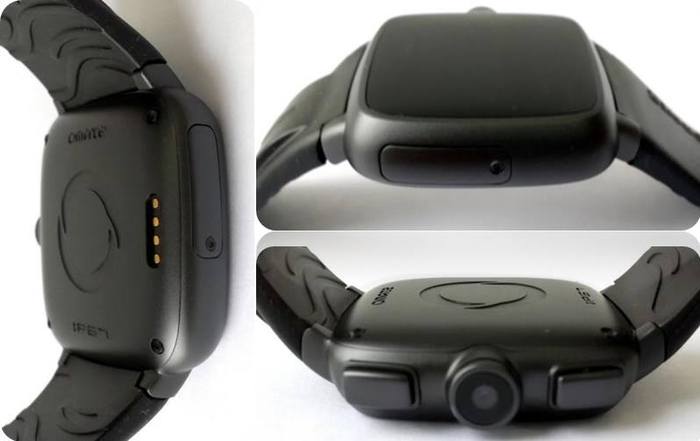
Fortunately, if you really want to buy a smartwatch soon,  want to avoid the above problems* and don’t want to wait and see what Google might have in store, then I recommend heading to Kickstarter and checking out the Omate TrueSmart.

omate

The two big advantages for the Omate, in my eyes, is the fact that it runs what is pretty much vanilla Android and comes with Google Play on board. While I understand most apps aren’t going to work well on it, as I’ve shown before, a developer can support a smartwatch with not a lot of additional work by simply following the design guidelines.

The big feature, that I don’t expect to be matched by any smartwatch from a large company, is the fact that the watch can be used independently from a phone: it has a micro-SIM slot and you can choose between two variants, one with European (2100) bands or American (1900). It is also water resistant, and comes with a Sapphire Crystal Glass to make it scratch-proof.

SPECIFICATIONS:

  • Dual Core Cortex A7 – 1.3GHz
  • Omate UI 1.0 / Android 4.2.2
  • 1.54'' TFT by LG display (240 x 240)
  • Multi-touch Capacitive Touch Screen
  • Connectivity capabilities:
    + 2G Quad Band: 900/1800/ 850/1900 GSM, GPRS, EDGE
    + 3G Mono band: 2 versions:
    you will be able to indicate which version in the Survey Form
    at the end of the Project)
    2100 (Europe) or 1900 (US)
    UMTS, HSDPA,HSUPA, HSPA, HSPA+
    + WiFi: IEEE 802.11b/g/n
    + Bluetooth 4.0
  • GPS
  • Embedded 5Mpixel camera
  • Audio Speaker & Microphone
  • Memory: 512MB + 4GB + (expandable by microSD 8/16/32GB)
    + Optional upgrade from 512MB to 1GB memory (If you increase your pledge, whichever pledge it is, by $20, we would gladly thank you with the memory upgrade)
  • Micro SIM card
  • 600 mAh battery: up to 100 hours standby time
  • Messaging Hub: SMS/MMS/Email/SNS
  • G-sensor (Accelerometer), E-Compass, Gyroscope, IP67
  • Vibration alert
  • Full set of pre-qualified Android applications
  • Over-the-Air (OTA) system firmware update

The company has already hit its goal of $100,000 a few times over, standing at $623,165 from 2,911 backers so far with 11 days still to go. They still have 1600 regular and 552 developer editions available, both of which are for $199, and nearly 3000 “Merry Christmas Personalized Edition”, where you can have a message of up to 12 characters etched on the back for $229.

To fund Omate’s KickStarter, use this link.

*I know the look of the Omate isn’t that great either, but I personally prefer it over Samsung’s. Having said that, it is unlikely that you’re going to want to wear this with a suit, unless you’re OK with your nerdiness (I am).

You are receiving this email because you subscribed to this feed at blogtrottr.com.

If you no longer wish to receive these emails, you can unsubscribe from this feed, or manage all your subscriptions

Android World Update # HTC Desire U International Giveaway & Galaxy Fame Winner Announced!

Android Authority
Android News, Reviews, How To 
Ready to move beyond the basics?

Enroll in this advanced DSLR course to explore more creative scenarios, image editing, and videography.
From our sponsors
thumbnail HTC Desire U International Giveaway & Galaxy Fame Winner Announced!
Sep 8th 2013, 19:36, by Derek Scott

aa-sunday-giveaway-thumbnail-645px

Welcome to the Sunday Giveaway! This week we’re giving away a HTC Desire U. But before we get to that, let’s move on to the winner of last week’s giveaway.

Samsung Galaxy Fame Winner: Sarah from Kentucky

Congratulations Sarah! Come Monday the Samsung Galaxy Fame will be in the mail and on it’s way to you. For all of you who didn’t win, fear not, as we’ve got plenty more cool things to give away, like this week’s item: the HTC Desire U!

Samsung Galaxy Fame Quick Specs

  • 4-inch display (800×480)
  • 1 GHz CPU
  • 512 MB RAM
  • 4 GB internal storage (expandable via microSD)
  • 5 MP camera
  • Android 4.0.3 Ice Cream Sandwich

HTC Desire U Review

Read our full written review of the HTC Desire U or check out the video review below:

How to enter the giveaway

We have changed up the Sunday giveaway a bit, from now on you will have to enter the draw using the RaffleCopter widget located below. To earn an entry ticket you either have to be already subscribed to our newsletter or you have to join our newsletter. We also have included up to 10 bonus entries that are available if you refer your friends to the giveaway. After you submit your entry ticket you will be given a unique URL that you can use to share with your friends. If your friend signs up you get a bonus ticket in to this weeks draw. You can earn up to 10 bonus entries.

Join Now!

a Rafflecopter giveaway

*Please note you will need to verify your email address, so ensure you enter a valid email address.

Terms & Conditions

  • The giveaway is an international giveaway and is open to everyone worldwide.
  • We are not responsible for lost shipments.
  • If we can not ship to your country, you will be compensated with an online gift card of equal value to the prize.
  • We are not responsible for any duties or taxes that you may incur.
  • Only 1 entry per person, do not enter multiple email addresses. We will verify all winners and if we detect multiple email addresses by the same person you will not be eligible to win.

You are receiving this email because you subscribed to this feed at blogtrottr.com.

If you no longer wish to receive these emails, you can unsubscribe from this feed, or manage all your subscriptions

Android World Update # Must read Android: top 15 stories this week

Android Authority
Android News, Reviews, How To 
Many wonderful memories are captured in black and white.

With digital photographs, the art is now in creating black and white images. This course will teach you how to use Photoshop techniques to create beautiful images.
From our sponsors
thumbnail Must read Android: top 15 stories this week
Sep 8th 2013, 19:00, by Bogdan Petrovan

Sony Xperia Z1 sample (6)

It was a busy, busy week for Android lovers, with everything from exciting product launches, to category-defining products, a new version of Android, and glimpses of what’s to come. These are the big stories, the essence of an entire week in just a few phrases. It’s must read Android.

The most popular operating system of all times just made its first billion.

OEM


What a delicious surprise from Google – Android 4.4 will bear the name of the popular Nestle candy bar, and Google wants it to be available to everybody!

Android 4.4 kitkat Google HQ Mountain view


Oops! A Googler got himself filmed casually using the next Nexus smartphone at the unveiling of the KitKat statue. The same device may have made an appearance at the FCC.

Nexus 5 at Android 4.4 KitKat statue unveiling


HTC unveiled several mid-rangers and a snazzy new color option for the HTC One, but will it be enough with all the competition?

htc one vivid blue aa 2


Now that Nokia is a Microsoft company (all hail Stephen Elop), the last hope for those who don't agree with the direction is to start over. Enter Newkia.

nokia lumia 928 aa phone speaker


With the usual fanfare, Samsung introduced a trio of new devices ahead of IFA, and we've got the lowdown for you.

Samsung Galaxy Note 3 with Samsung Galaxy Gear


The G Pad 8.3 is a sleek peace of technology, with its metal body and Full HD display. A few nice software features complete the package.

LG Pad hands on IFA 2013 AA


Sony made quite a splash with the Xperia Z1 and its QX10 and QX100 lens accessories. Photo bugs, is this your dream phone?

sony xperia z1 lens qx100 aa 10


What’s the biggest story in Android this week? Tell us in the comments.

You are receiving this email because you subscribed to this feed at blogtrottr.com.

If you no longer wish to receive these emails, you can unsubscribe from this feed, or manage all your subscriptions

Sunday, September 8, 2013

Android World Update # Top 5 Manga and Anime Apps

AndroidPIT News + App Tests RSS Feed
This feed includes text previews of the latest news articles and app tests on www.androidpit.com. Click on the article title to read the entire article. 
Use GarageBand in Just 1 Hour

Learn to create music in GarageBand and become the Beethoven you've wanted to be. This online course is just $30. Sign up today!
From our sponsors
Top 5 Manga and Anime Apps
Sep 8th 2013, 18:00, by Loie Favre

Although Japan is really far away, some parts of their culture have crossed many kilometers to our door steps. Manga and Anime, for example, have found more than one way to be present in our country. I personally don't know much about the Japanese cartoon world, beyond the cartoon television series’ that we all saw as children (Sailor Moon, Candy Candy, Dragon Ball Z...). In this article I have tried to introduce a little bit more of this Japanese art to our readers by selecting five different and varied applications, but as always, suggestions are also appreciated.

androidpit manga
© Danny Choo /Culture Japan vía Flickr CC.

(This is a preview - click here to read the entire entry.)

You are receiving this email because you subscribed to this feed at blogtrottr.com.

If you no longer wish to receive these emails, you can unsubscribe from this feed, or manage all your subscriptions

Android World Update # BitTorrent Sync: Everything you need to know

Android Authority
Android News, Reviews, How To 
Ready to move beyond the basics?

Enroll in this advanced DSLR course to explore more creative scenarios, image editing, and videography.
From our sponsors
thumbnail BitTorrent Sync: Everything you need to know
Sep 8th 2013, 17:52, by Joe Hindy

BitTorrent Sync

There are a lot of ways to sync files between your PC and your various mobile devices. The most popular one is cloud storage, but there are other ways. BitTorrent Sync is an app that keeps your phone synced to your computer and both synced to your tablet. It’s a unique and powerful application and here we’ll take a closer look. If you’d rather watch than read, the video is at the bottom.


BitTorrent Sync screenshot 1

Functionality

Okay so here's how this app works. You download the app to your device and download the companion app to your computer. According to the download page, it currently supports Mac, most forms of Linux and Windows. Once both are installed, you're ready to get started.

So what you need to do is turn both apps on and get them synced up. This took a minute to figure out but it's not overly difficult. Once it's done, you simply put items from your computer into the sync folder to sync to your phone. Likewise, you can put files into the folder on your phone and it will sync with your computer.

Once the setup is complete, using it is easy. You can sync files as often as you wish and only download the ones you actually want. This is an amazing app for movies, as you can sync your movies and then only download ones you want to watch right then. It works with photos, music, and pretty much everything else.

That's really all there is to it. This app connects your computer to your android device in an easy manner to sync files both ways. To top things off, you can even sync mobile to mobile using QR codes. So you can keep your phone connected to your PC, your tablet connected to your phone, and your tablet connected to your PC. It’s also really handy for sharing things.


BitTorrent Sync screenshot 2

How can I use this?

Many maybe asking how they can use this. The real questions is what can't you do with it? You can sync literally every file type from device to device and download only what you need. It's a truly powerful service that has the capacity to completely replace your cloud storage options and keep everything between you and no one else.

If you're looking for recommendations, we don't really have one because the sky is the limit here. Our favorite is to sync media only when you need it and save the rest for later so you don't waste your internal storage. You can sync presentations, documents, and all sorts of other files for quick reference later if need be.


BitTorrent Sync screenshot 3

What we liked

Okay so here's what we liked. You can literally sync every conceivable file type out there. That gives it a wide range of uses such as backing up applications, keeping your media in sync, and all sorts of other uses. You can even use it to transfer files from computer to device without plugging your device in, which is really nice.

The other thing we liked was the selectiveness. You can choose to download items that are synced and you can choose not to. So if there are some files you don't need, but want synced anyway, they don't take up precious storage space on your device. They're simply there when you need them.


BitTorrent Sync screenshot 4

What we didn’t like

And here is what we didn't like. The setup process isn't difficult, but it isn't exactly obvious either. It took some fooling around to get things going and both the computer and mobile interfaces took a few minutes to get used to. Once you get it, it's not bad, but until then, it can get a tad frustrating.

Other than the difficulty at the beginning, there really isn't much else wrong with the app. We suppose we could take a few points off for the bland look of the interface, but really that would just be nitpicking. The app is legitimately well done.


BitTorrent Sync screenshot 5

What we didn’t like

So would we recommend BitTorrent Sync? The answer is a resounding yes. The app simply has too much upside and virtually no downside. Turning your computer into your own personal cloud storage solution negates the need to pay for things like Dropbox or Google Drive for most people who want the storage but don't really use it for anything specific.

We do wish the beginning process was a little easier to get through, but all things considered it wasn't all that bad to begin with. At the end of the day, this is a very useful application and it's flexible enough to do with what you please. Do yourself a favor and check it out. We can see this app becoming a must have app in any Android app collection.


BitTorrent Sync final thoughts

So would we recommend BitTorrent Sync? The answer is a resounding yes. The app simply has too much upside and virtually no downside. Turning your computer into your own personal cloud storage solution negates the need to pay for things like Dropbox or Google Drive for most people who want the storage but don't really use it for anything specific.

We do wish the beginning process was a little easier to get through, but all things considered it wasn't all that bad to begin with. At the end of the day, this is a very useful application and it's flexible enough to do with what you please. Do yourself a favor and check it out. We can see this app becoming a must have app in any Android app collection. If you want to download this, click the button below.

Get it on Google Play


The Video

You are receiving this email because you subscribed to this feed at blogtrottr.com.

If you no longer wish to receive these emails, you can unsubscribe from this feed, or manage all your subscriptions

Android World Update # A Nexus fan's take on the Moto X

Android Central - Android Forums - News - Reviews - Help and Android Wallpapers
Android Central 
100 Greatest Books on MP3

Get the 100 greatest books of all time preloaded on an MP3 player. Listen to the classics like Tom Sawyer, Moby Dick, Pride & Prejudice & 97 more. Less than $1 each.
From our sponsors
A Nexus fan's take on the Moto X
Sep 8th 2013, 16:23, by Jerry Hildenbrand

Moto X.

It all started when Phil sent me the review unit

Motorola will ask for it back soon, but I've had it long enough to know a few things, and get a pretty good feel for this phone. And that's good, because as I've expressed before, I'm not buying one from a carrier and Motorola is taking their sweet time to offer an unlocked version. More on why that was a mistake a little later. Likely, my constant crying concern about the issue is what prompted Phil to send it here. I'm a pain in the ass when I'm whiny and cranky, and like a baby with a pacifier, the review unit shut me up. I'm able to admit this.

Anyway, like I said I've had the Moto X long enough to have a solid feel for the thing, and to make some pretty strong comparisons against what I think was the best Android phone in a long time — the Nexus 4. So let's do that.

read more


You are receiving this email because you subscribed to this feed at blogtrottr.com.

If you no longer wish to receive these emails, you can unsubscribe from this feed, or manage all your subscriptions