Friday, March 8, 2013

Android Phone Fans

Android Phone Fans


Cut the Rope: Experiments update brings ant colonies to help feed Om Nom [VIDEO]

Posted: 07 Mar 2013 06:44 PM PST

Cut the Rope is one of the most unique games in the Google Play Store, and the Experiments offshoot has just gotten a nice new upgrade. Today’s upgrade is called Ant Hill, and it evolves the gameplay experience by bringing a colony of ants to help feed everyone’s favorite lovable critter — Om Nom.

The ants will care the piece of candy as far as they can carry them, and it’s up to you to figure out the best way to get the treat to Om Nom while also getting all three stars in the level. These levels will tax your brain a bit so if you are looking for some fun and a decent problem-solving exercise you shouldn’t hold back on downloading this one. The upgrade is free if you’ve already bought the game, otherwise you can get it for $.99 in the Google Play Store.

LG Optimus F7 launches as Optimus LTE 3 in Korea

Posted: 07 Mar 2013 06:06 PM PST

Last week we caught wind of a possible LG Optimus LTE 3 headed our way, and we might have a bit of an idea of what that device turned out to be. It looks like the LG Optimus F7 has adopted that name for its launch in Korea, as the devices share near-identical specs and aesthetics. The device is tricked out with a 4.7 inch IPS display with a resolution of 1280×720.

Inside will be a 1.5GHz dual-core Snapdragon S4 processor, 2GB of RAM, an 8 megapixel rear camera with a 1.3 megapixel webcam, Bluetooth 4.0, a 2,540mAh battery and more. SK Telekom will put the device up for sale tomorrow, apparently, which is unusually quick turnaround from having its press release come to light just today (but, again, if it’s just the rebranded Optimus F7 then that’s no issue). The device will launch in both white and black.

[via Unwired View]

Weather Bomb makes reading weather reports absolutely mesmerizing

Posted: 07 Mar 2013 04:54 PM PST

Weather apps are a dime a dozen these days, so an app really needs to stand out to get me to take notice. Weather Bomb fits the bill quite nicely, and just 10 seconds with the app will let you know why. Weather Bomb delivers comprehensive weather forecasts by giving you a nice look at temperature, precipitation, humidity, cloud formation, wind patterns and even more over a period of days and times.

This particular app simply lets you thumb back and forth across the map or daily timeline to get a time lapse of the radar as if you were watching the meteorology report on your local news channel. Couple its easy-to-digest information with an app that’s pure holo and you’ve found my new favorite weather app. Oh, and best of all, it’s free! Download it in the Google Play Store and see if you can’t find something that you like in this very beautiful package.

[via Reddit]

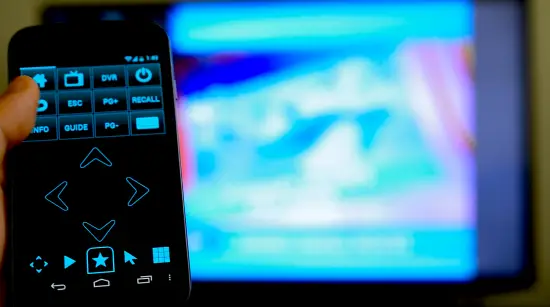
Able Remote update comes with improved Netflix support, but Google TV V3 support still missing

Posted: 07 Mar 2013 04:28 PM PST

If you’re a fan of Able Remote then you might want to check the Google Play Store as the app has just gotten an upgrade. It’s quite small in scope, but it does fix some very annoying pairing issues it had with Netflix. That’s all fine and dandy, but we’re most worried about the overall compatibility with Google TV V3.

Unfortunately, that particular hurdle still hasn’t been cleared. Google is taking quite a long time to release a new channels API, so until they do Able Remote will not be compatible with the latest versions of Google TV. Aside from all that, the usual pot of bug fixes and performance enhancements have been made so users will want to grab the upgrade regardless. You can find everything you need in the Google Play Store.

[via GTV Source]

LG Intuition OTA exits lengthy testing process, still proceeds to be ultra buggy

Posted: 07 Mar 2013 04:10 PM PST

LG and Verizon have long promised that the LG Intuition would receive received the upgrade to Ice Cream Sandwich, but lengthy delays — likely due to carrier and OEM “testing” — delayed that to no end. We have to wonder what, exactly, was being tested as many users have come forward regarding some rather major issues post-update.

For starters, it seems to be nuking the gallery app for users, with some mistaking this behavior for their data being wiped. Fortunately it sounds like the data is safe, it’s just that it can’t be accessed without a file browser. On top of that, it seems Google Play Store access is broken for many users, and other miscellaneous app errors are being thrown every which way.

It’s a classic case of “out of the frying pan and into the fire,” and for the time being it doesn’t look like either party — be it Verizon or LG — has a solution. In fact, one might question if either of the two even know about what’s going on. That’s why we’ve contacted our friends at each respective company to find out, and we’ll let you know if we hear anything back.

In the meantime, LG Intuition users are advised to reject this update. It might go off perfectly for you, but you’ll have a lot more peace of mind by rejecting it altogether in the off chance that it doesn’t.

[Verizon 1, 2, 3 via Android Police]

Nexus 10 review from an iOS user’s point of view

Posted: 07 Mar 2013 03:28 PM PST

This image has no alt text

For many Android users, they would rather lick a toilet seat than to so much as touch an iOS device. I’m sure Google appreciates the dedication, but unfortunately that can leave some of us with a good amount of… bias. While it’s great to read a review of a new Android device from a devotee, it can also be just as valuable to get an opinion from the other side of the fence. Perhaps that’s why I found this review of the Nexus 10 from iSource so refreshing. No blind fanboyism. Just a pure, honest opinion, from a techie who has an affiliation with Apple products and has owned every iteration of the iPad (even dabbled with the Nexus 7 in the past).

While he largely had great things to say about the tablet, issues arose from Samsung’s less than premium build quality, and overall inconsistencies within Android’s UI that eventually pushed said reviewer back to his beloved iPad. I get it. I do. Small issues for someone like myself but I believe he made some pretty valid points. With the Nexus 10 you’re getting 3 things: an awesome processor, amazing display, and great price. For some, that’s all they need. My favorite snippet:

“I have been asked the question, "How could you prefer a platform that doesn't offer as many options or customizations as Android?" before. Just remember that this review is from the perspective of someone who is an iOS user, and is happier with that experience. Even though I am a tech professional by trade, have been interested in mobile technology for close to 20 years, and have owned at least one device running just about every major mobile OS ever produced, that doesn't mean that I am automatically required to run Linux via a command line and carry a 6" phablet running the latest version of Cyanogen to keep my geek status card certified and stamped. Believe it or not, some of us tech enthusiasts actually PREFER simplicity and a clean look and feel. But, again, that's just me.”

Still, Android users will be quick to point out how much more a power user can do with the Android OS, a testament to its superiority but honestly, that’s not for everyone. And if it’s not — there’s absolutely nothing wrong with that. Personally, I could never leave Android and believe it or not, I also like peanut butter in my pepperoni pizza. Just because your palate isn’t advanced enough to handle the complexities of the two flavors exploding in your mouth doesn’t mean you’re any less of a person. It only means you like something simpler, and that’s okay. I’ll never understand all the hate towards people who simply prefer an OS that’s different or more “simple” to use (sometimes simple is good), and although I’ve sent a jab or 2 the way of an iOS user in the past and will continue to do so in the future, I mean no ill will by it and it’s always in good fun.

For those that thought the ending of this review was predictable, let me remind you of another post from a member of iSource who reviewed the Samsung Galaxy Note 2 and at the end of the day, fell in love with it, making it his daily driver. It happens. So, if you’re an Android user who was thinking of purchasing the Nexus 10, or perhaps mixing things up with iPad, you may want to check out the review for yourselves over on iSource.com. After you’ve checked it out, let us know if you agree or disagree with this man’s review.

FYI: Google I/O site has some fun easter eggs for you to play with

Posted: 07 Mar 2013 03:10 PM PST

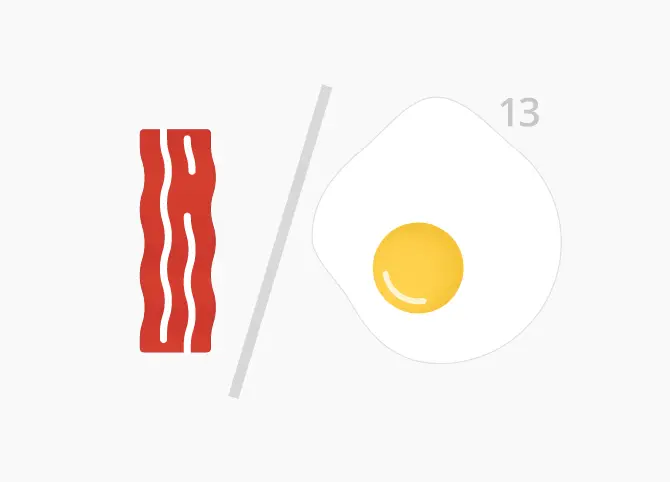
While we’re all waiting for the floodgates to the Google I/O 2013 registration page to open up on the morning of March 13th, Google seems to have injected some fun easter eggs into the main landing page for the developers’ event. The “I” and “O” react to mouse clicks, and you can get a nice variation on the event logo by inputting the right string of 0′s and 1′s (binary code, if you aren’t familiar).

For instance, inputting “01111111” will bring up a Matrix-esque ASCII visualization of the logo, and “10001000” will bring up a cool synthesizer. My personal favorite, “10010000“, brings up a tasty dish of bacon and eggs (because when isn’t bacon awesome?)

There are quite a few to be discovered here so take a look at the quick cheat sheet below and give it a try for yourself. Oh, and we’re hearing from our ninja sleuths that Google developers have a fun time adding more everyday, so if you find any that aren’t listed below be sure to let us know in the comments section!

  1. 01110101
  2. 01000101
  3. 01010011
  4. 10010000
  5. 10001000
  6. 00101010
  7. 11100111
  8. 01111111
  9. 00111001
  10. 11010011
  11. 11011011
  12. 10000001

[Google I/O via TheNextWeb]

Sprint LG Optimus G gets Jelly Bean upgrade

Posted: 07 Mar 2013 02:32 PM PST

There’s quite a bit of Jelly Bean news today, folks, and now Sprint’s getting in on the fun. The carrier has announced the upgrade to Android 4.1.2 for its LG Optimus G. It’ll bring obvious goods such as Google Now, expandable notifications and an updated Android Beam experience, alongside the many other things unique to Jelly Bean.

Alongside that, a bunch of changes specific to the Optimus G have been made. Sprint says you can expect a smoother user interface thanks to the Android framework doing all the heavy lifting for vsync timing, user-installable keyboard maps, an improved camera app, improved voice search, the ability for third-party launches to add widgets without requiring root access, the ability to download the QuickTranslator application from the Application Manager and more.

That’s quite the hefty update, but you’re probably wondering how you can get it anyway. As usual, you can make your way to Settings > About Phone to check for the upgrade, and make sure your WiFi is on and your battery is charged to at least 50% to ensure the best and most safe updating experience.

[via Sprint, thanks to everyone who sent this in!]

Google in danger of having Maps banned in Germany

Posted: 07 Mar 2013 02:01 PM PST

Some very interesting developments have taken place over at the German court halls. The patent dispute between Microsoft and Google/Motorola, the one that accuses the latter’s Google Maps platform of infringing on map-related patents owned by the former, seems to be heating up.

According to FOSS Patents, German courts are inclined to enforce an injunction on Google Maps in Germany, and this ban wouldn’t just affect the use of the service on mobile. Google would apparently need to unlist Google Maps in the Play Store (and possibly on other platforms) for German users, block German IP addresses from accessing Google Maps from any web browser, and if it wants to continue to distribute Chrome in Germany they must implement a filter that effectively blocks Google Maps.

Those are some pretty high stakes in a time where the likes of Microsoft, AOL and Nokia are gunning for Google’s head in the digital mapping scene. To sidestep such a huge issue Google would have to convince the courts to narrow the scope of the patent or convince the courts that no infringement is taking place, neither of which seem very likely at this point.

The only other (obvious) alternative if Google doesn’t want its maps service shutdown in those parts of the world is to pony up the same license fee that other OEMs have been paying to Microsoft for each Android device sold. Motorola obviously feels strongly against doing that considering it was them that initiated the lawsuit in Germany in the first place (though they probably felt like Microsoft was going to pull them into another battle anyway). The two will grind it out for a while yet, but it won’t be long before we get a stance from Google or Motorola (or the German courts) either way.

[thanks PhaseBurn!]

Motorola officially details Jelly Bean rollout for DROID RAZR/MAXX

Posted: 07 Mar 2013 12:55 PM PST

Motorola couldn’t keep things on the low regarding its Jelly Bean soak tests for the DROID RAZR and RAZR MAXX, so what better way to deal with a problematic leak than to embrace the opportunity and run with it? Motorola has posted an official blog post about the upgrades over at its site, and while there aren’t any surprises to be had — it’s Android 4.1 with Motorola’s custom user experience, and we all know about that by now — we’re still excited to know that a few more of you will join us in Jelly Bean land sometime soon.

Some of you might already be seeing the upgrade on your handset, but Motorola has stressed that this is a phased rollout. If you don’t receive a notification to download it right away then you can try your luck at pulling it from the servers by visiting Settings > About Phone. Failing that, I guess you’ll just have to wait until Motorola decides your particular device is cool enough to be drenched in gooey Jelly Bean goodness. Head to Motorola’s blog for more information.

OUYA opens shop, games go live for download

Posted: 07 Mar 2013 11:04 AM PST

Though early backers won’t have their consoles until later this month, those in the developer program might notice a bit more activity than usual in the OUYA Shop. Those working tirelessly to bring their content to OUYA have been given the go ahead to begin uploading games. It’s all part of an effort to make sure there is plenty available for new owners come launch day.

One way to encourage devs to put the finishing touches on their games and get them up for download comes in the form of a contest. OUYA is going to feature the top three developers (based on the first 6 weeks of availability) in a series of short documentaries.

The success of OUYA greatly depends on the content available. If the console comes up short on dev support, users will have little incentive to move away from gaming on a traditional console or mobile device. So far the community support for OUYA has been overwhelming, so we expect big things come launch day.

[via GameFans]

Apple marketing chief jumps on latest Android security report

Posted: 07 Mar 2013 10:54 AM PST

Not to miss a golden opportunity to knock Android, Apple marketing chief Phil Schiller tweeted a link to F Secure’s new report on Android security today. It was accompanied by the text, “Be safe out there.” Ouch, Phil. That really hurts.

If you’re not familiar with the contents of the report, it claims that Android malware is at all time high with 79 percent of all mobile threats targeting the platform. It’s the same rhetoric we have been sold for the past couple of years, little more than good advertising to sell mobile security software. Or a different brand of phone, in the case of Schiller.

Yes, Android is susceptible to malware. Yes, more of it is running around today than in the past. But the problem isn’t as widespread as Schiller would like users to believe. His advice is good, though. As long as users are “safe” about the way they use their devices, including what apps they download and install and where they obtain the apps, there is actually little need for concern. Take that part to heart, at least.

[via The Verge]

Sony Xperia Tablet Z launches March 22nd in Japan

Posted: 07 Mar 2013 10:09 AM PST

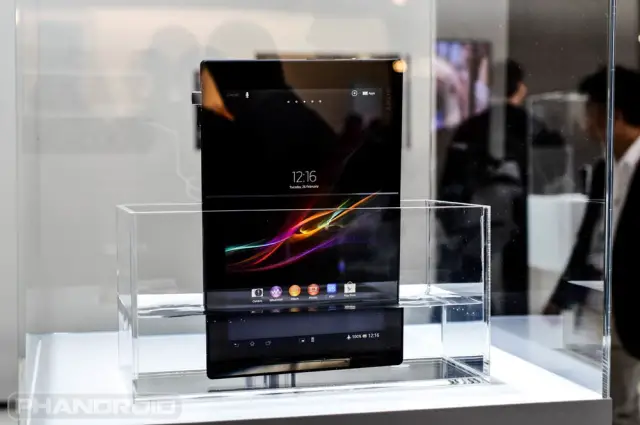
The Sony Xperia Tablet Z, which we ogled at Mobile World Congress, will start its worldwide rollout in Japan later this month. Available on NTT DoCoMo’s LTE network, the slate will launch on March 22nd following a pre-order period starting March 9th.

The Tablet Z will be available in both black and white finishes when it goes on sale for an unspecified price (expected to be near $900 US). The tablet boasts a waterproof, dustproof design, 1080p display, quad-core processing with 2GB RAM, and a super thin profile ( a mere 6.9mm).

Expect the Japanese release to be followed with a greater availability across the globe. Sony has not detailed their exact plans, though.

[via Xperia Blog]

AT&T’s HTC One X gets Jelly Bean update

Posted: 07 Mar 2013 09:12 AM PST

According to AT&T, HTC One X owners can expect to see the update to Android 4.1 Jelly Bean begin arriving on handsets today. It still keeps last year’s HTC flagship a hair behind the curve in terms of the latest Android software, but it’s a major upgrade from the Ice Cream Sandwich build the phone shipped with.

AT&T detailed what users can expect from the update in a blog post, including new Jelly Bean features such as Google Now, enhanced notifications, and more. The phone’s Sense 4 build remains more or less the same with the addition of a new front-facing camera countdown timer. (Curiously, that blog post covering the update has since disappeared from the web. We’re unsure if this means the update launched prematurely.)

To check for the update, which also enable ISIS mobile payments and AT&T’s Locker cloud service, navigate to your phone’s settings menu and check under ‘About phone.’

[via AT&T | Thanks, Rel!]


Samsung comes up short in UK 3G lawsuit

Posted: 07 Mar 2013 08:55 AM PST

More legal news out of Samsung’s camp today as the Korea company has failed to convince a UK court of claims that Apple has violated three 3G data transmission patents with the iPhone. The result, aside from more legal ammunition for Apple, is that the California-based company won’t face a sales ban any time soon.

The news comes at the same time we are learning of Nokia backing Apple on an appeal to the US court system pertaining to injunctions against Samsung in North America. Samsung is still deciding whether or not to appeal the UK 3G case.

[via Reuters]

Google Android News Android Forums

Google Android News Android Forums


Samsung Pays $111 Million For 3% Stake In Sharp To Secure LCD Supply

Posted: 07 Mar 2013 02:26 PM PST

Sharp

Samsung is a fan of Sharp’s displays and has acquired three percent of the Japanese company for $111 million. The move now makes Samsung the largest shareholder outside of a financial institution, and the fifth largest shareholder overall. This three percent stake helps solidify both companies’ relationship and ensures a steady supply of LCD panels for Samsung’s products.

Sharp isn’t doing so well financially and has created similar deals with such companies as Qualcomm who owns 2.56 percent of the business. Foxconn could soon be another shareholder Sharp with a 10% stake. However, that deal was announced in March 2012 and closes at the end of this month.

Source: Unwired View


Come comment on this article: Samsung Pays $111 Million For 3% Stake In Sharp To Secure LCD Supply

How to backup apps and app data on your rooted or non-rooted Android phone or tablet

Posted: 07 Mar 2013 02:17 PM PST

backup-options

We’ve all been in a situation before where we needed to either factory reset our phone, send it in for a warranty replacement, etc. Not a big deal by itself, but you’ve got 3 stars on 80% of Angry Birds levels, and who would want to lose that accomplishment? You want to be able to keep that data forever. Fortunately, it’s pretty easy to do, and this guide will help you get started. You’ll even be able to start transferring some app data to new phones when you upgrade.

carbon_backup_google_play_banner

Carbon – No Root Method

Carbon is an application by popular developer, Koushik Dutta, who has also developed ClockworkMod Recovery, ROM Manager, and a recent Superuser application. Needless to say, he’s made some extremely useful applications that are very widely used. Carbon is no exception, and it allows any device running Android 4.0 or higher to back up their applications and data without root. All you’ll need is your device, a computer, and your USB cable. (It’s worth noting that according to its Play Store page, Motorola devices are not supported due to a bug on Motorola’s part.)

First off, you’re going to need the free companion desktop application to use the backup features (for non rooted users only).  There are versions for Windows, OS X, and a Linux shell script, so regardless of what kind of computer you’re using, you’ll be able to take advantage of Carbon. If you’re using Windows, you’re also going to need specific drivers for your phone. There’s a link on the download page (above) with a list of drivers for easy access and installation, and just about every major OEM is covered. OS X and Linux users don’t have to worry about the driver issues.

Once you have that all set up and running, start the Carbon desktop app, connect your device via USB to your computer, and start Carbon on your phone or tablet. Wait just a few seconds, and Carbon will be fully enabled so you can start backing up your apps. You can now disconnect your phone/tablet from your desktop and utilize the app itself. You won’t have to reconnect your phone/tablet again, but if you reboot your device you will have to connect it again to re-enable the app. It’s an inconvenience, but a minor one when you consider this is the only option for backing up app data for non rooted devices.

There’s a few cool features and tricks you’ll probably want to take advantage of while using Carbon, though, so poke around and look at some settings before you back up your massive stockpile of apps. Let’s say you really only want to back up your Angry Birds data, but you don’t mind re-downloading the app from the Play Store first. If you swipe up the bottom tab in Carbon, you’ll see a check box that gives you the option of backing up only the app data, and it does exactly that; your bigger apk will not be saved, but the data that goes along with it will be saved. You’ll have to download the app from the Play Store before you can restore that data, but if you want to save some storage space on your phone or SD card and don’t mind the extra step, that can be a pretty helpful option. There are also quick options to select and deselect all available apps in this window.

If you don’t mind going for the paid version of Carbon ($4.99), you’ll get a really cool feature; the ability to back up your data to cloud storage. Carbon supports Dropbox, Box, and Google Drive, and it can seamlessly get your data on your favorite cloud service. That’s extremely helpful if you’re switching over to a new phone without an SD card, or just to make a backup in case you were to ever lose your phone.

So let’s fast forward a bit and say you’ve got your warranty exchange, you’ve finished your factory reset, or you just brought your shiny new phone home after upgrading. Restoring those applications is quick and easy, and all you’ll have to do is download Carbon from the Play Store. After downloading, run Carbon, connect it to your computer again, and you’ll be able to restore all of your apps and data. That precious Angry Birds is still completely intact. You’ll never have to worry about losing data again.

You can also use Carbon as a rooted user  and you don’t need to bother with the desktop companion software. Everything else works the same, but I prefer the next option, Titanium Backup because it’s more feature rich, but Carbon is still a great app.

QR Code generator

Play Store Download Link

QR Code generator

Play Store Download Link (Premium)

titanium-backup

Titanium Backup – Root Method

Carbon is useful, and if you can’t or don’t want to root your device, its backup capabilities are fantastic. If you are rooted, however, it’s hard to beat Titanium Backup’s extremely rich feature set. It essentially works the same as Carbon but with a bit more flexibility and automation. It also works on any device that can be rooted, regardless of manufacturer or OS version.

First off, with Titanium Backup, you must be rooted. There’s no way around it. If you need some help on that, we do have a guide to rooting to get you started and answer most of your questions. If you’re already rooted, just download and install the app and start it. It will prompt you for root permissions, which you will want to grant, of course, and you’re ready to start backing things up.

Titanium Backup has three tabs you’ll be looking at; an overview page, a backup/restore page, and a schedules page. For this guide, we want that middle tab to start backing up applications. You’ll see a long list of every single application that’s installed on your phone, including system applications and data. This is the biggest difference from Carbon, and it’s extremely important to remember. Backing up and restoring system applications and data can cause serious problems. As a general rule of thumb, it’s much safer to manually sign back into accounts and adjust settings instead of restoring a backup for those settings. In some cases, restoring system data will be fine, but more often than not it will cause problems. Restoring system data from one device to another will definitely cause problems.

Now that we’ve got that friendly disclaimer out of the way, tap the “Click to edit filters” button above your app list. For safety, we want to uncheck the boxes under “Filter by type” except for the User option. Only the User box should be checked, and the System and Uninstalled box should be blank. Tap your green checkmark at the top right of the screen to go back to your app list that’s been completely filtered to only user apps and no system apps. Here you can manually select which apps to backup and restore, so if you really only wanted to keep data for your games when moving to a new device, it’s easy to do so.

Now let’s say you want to run a full backup for your apps. That button on the top right of the screen, next to the magnifying glass, is your “batch” button in Titanium Backup, and that’s where the magic happens. Tap that and it will give you a long list of actions you can take. For this backup, we want to run the “Backup all user apps” action. This pulls up a list of your user apps where you can individually check each app you want to back up, or you can simply select all of your apps. After figuring out what you want backed up, tap the green checkmark at the top right and the batch action will run in the background.

Restoring your apps again is pretty much the same thing. When you go to your batch actions list, scroll down a bit until you find the action for “Restore all apps with data.” This list will show each app you’ve backed up so you can batch restore everything you need, data included. The free version of Titanium Backup will make you press a yes dialog box for each app you want to restore, so it’s not totally automated, but the paid, premium version does it all behind the scenes. And, like Carbon, you can set up schedules to back up at specific times and, if you opted for the paid Pro Key, sync your local backups to cloud storage. So if you’re in one of those situations we mentioned earlier, like moving to a phone without an SD card or just making backups in case your phone is lost or stolen, Titanium Backup supports the same three major cloud storage services for backing up your data.

QR Code generator

Play Store Download Link

QR Code generator

Play Store Download Link (Premium)

Like always, there’s plenty of Android apps available that do what Carbon and Titanium Backup can do, (although Carbon is the only app that can fully backup nonrooted devices) so if neither of these seem like your cup of tea, it’s easy to find an alternative. Both of these apps have relatively simple, easy to use designs that most users can figure out to do something that we’ve all needed to do once or twice with our phones.


Come comment on this article: How to backup apps and app data on your rooted or non-rooted Android phone or tablet

FBI continues to seek data about users from Google without a warrant

Posted: 07 Mar 2013 01:41 PM PST

Logo of Google outside their headquarters building in Mountainview, California.

During 2012, Google says they received “national security letter” requests for up to 2,000 accounts from the Federal Bureau of Investigation. National security letters are a tool used by the FBI and other government agencies to gather financial, phone and Internet data without a warrant. National security letters are normally subject to gag orders and even acknowledging their existence can land the recipient in hot water. Nevertheless, Google provides period reports concerning the number of inquiries it receives pursuant to the letters.

Google has provided these numbers in the past. In 2009 they received up to 1,000 letters and in 2010 the range was between 2,000 and 3,000 users. Google only releases a range for the number of letters of received due to concerns expressed by the FBI and other agencies about the impact on active investigations if exact numbers were released.

In their most recent release, Google also provided some information regarding their policy for responding to the letters. They indicate that they do not believe the government can obtain Gmail content, search query information, videos, or even user IP addresses. Most companies will not provide any information about the letters received or they will indicate in a very generic fashion that they comply with all legal requests for information. The FBI has provided template information regarding the letters which companies may respond to with up to thirteen different data points. However, only two points are known – “transaction/activity logs” and “header information” from emails.

source: The Wall Street Journal


Come comment on this article: FBI continues to seek data about users from Google without a warrant

Featured Android App Review: Clean Master [Tools]

Posted: 07 Mar 2013 11:13 AM PST

Clean_Master_Cleaner_Splash_Banner

Spring is in the air folks and you know what that means, spring cleaning. When people say, “spring cleaning” people always think about cleaning their house or office, but it doesn’t stop there. Your phone might need a little as well, especially if it’s not running like it was when you first took it out of the box. We actually did a post about that last year, but there is a newer app on the scene that will assist you in cleaning your cache, uninstalling apps, and deleting  files, bookmarks, and text messages. It’s called Clean Master from Ksmobile, and it reminds me of CCleaner for Windows. It’s so simple to use, that I guarantee that after using the app for a few minutes, your phone will be as good as new again.

The interface is simple, clean, and features the Holo UI. Those are three things I love in apps. The main screen will give you a quick glance at how much storage you have left on both your device and on your SD card (if  installed). You have four options: History, Privacy, Tasks, and App Manager.

History has two parts and the first is your cache, which are temporary files created by all your apps. Over time they accumulate and take up a lot of unnecessary space as well as drain your memory. Just tap “History” and you will get a list of all your installed apps as well as how much cache storage each one has. The majority of them will be classified as System Cache. Clean Master will already check off the ones that it feels you should delete, and it will also go as far as tell you what you shouldn’t delete. You can still uncheck or check any of the apps if you so wish. Just tap clean, and presto, it will delete all the cache files from the selected apps. To give you a point of reference, my current phone is about 4 months old, and my total cache was 821MB. Cleaning your cache is probably something you should do every week or so. The second part of History covers your residual files such as music, videos, documents, etc. You can quickly see all these types of files as well as how much space they are taking. Just checkoff the ones you want deleted and tap clean.

Next up is Privacy. In Privacy, you can delete SMS/MMS messages, Call Logs, and Search History. For both SMS/MMS and Call Logs, you will have the choice of deleting all history or by contact. One thing I would like to see is the ability to tell Clean Master to only delete messages that are older than a certain amount of days. This way you can still keep some of your more current messages, and is something they may include in a future update. If you tap on Search History, you will be given a list of the apps that are saving such data like your Browser, YouTube, Gmail, Google Search, etc. Unfortunately Chrome doesn’t show up in this list, but is something that should be rectified soon. In addition to Clean Master’s built in deleting mechanism, the app will also take you to the stock Android app page for individual apps so that you can clear data manually, which would also remove account settings and passwords.

Tasks is simply a task killer. It’s not a task manager, which would supersede Android’s task managing abilities, of which I’m totally against. This is a manual task killer, which probably isn’t all that necessary since every Android phone UI has it’s own built in version. Nevertheless, Clean Master lets you checkoff a bunch of apps to close at the same time.

Last but not least is the App Manager, which lets you uninstall apps as well as backup apks. Android already makes it fairly easy to uninstall apps, but Clean Master makes things easier when you are really looking to delete a lot of apps. It will list all apps installed on the device as well as any third party apks. You can check off the ones you want to be uninstalled and bingo, Clean Master will get rid of them in one swoop. If you want to backup any apks, you can do that as well, but keep in mind, it won’t backup app data even if you’re rooted.

So there you have it. Clean Master is quick and painless and will help you free up a lot of space that will enable your phone to be a little bit more like it was the day you first turned it on. Of course, we can all use the extra space for more music or pictures as well. It’s absolutely free in the Play Store, so give it a shot and let me know what you think. You can check out my hands on video below as well as download links.

Full Features List:

  1. History Eraser –  clean cache and clean residual files
  2. Privacy Protection – clean selected messages (SMS&MMS), selected call logs, Google search history, clear clipboard data, and protect other app privacy such as wechat, whatsapp, etc.
  3. Kill running tasks/release RAM/1Tap Boost
  4. Application manager – uninstaller and backup

Clean Master supports the following languages: German, Italian, Spanish, Korean, Russian, Simplified Chinese (China), Portuguese, Vietnamese, Hungarian.

Clean_Master_Cleaner_01 Clean_Master_Cleaner_02 Clean_Master_Cleaner_03 Clean_Master_Cleaner_07 Clean_Master_Cleaner_06 Clean_Master_Cleaner_05 Clean_Master_Cleaner_04 Clean_Master_Cleaner_08

Click here to view the embedded video.

QR Code generator

Play Store Download Link


Come comment on this article: Featured Android App Review: Clean Master [Tools]

AT&T Hints At HTC One X Finally Receiving Jelly Bean [Update Is Now Live]

Posted: 07 Mar 2013 10:43 AM PST

ATT-HTC-One-X-up-close

Update: AT&T’s blog post about the Jelly Bean update is live again and HTC One X owners should get the update starting today, March 7th.

AT&T’s HTC One X was released in May 2012 and users have been waiting for an update to Jelly Bean ever since. Now, thanks to a post on the AT&T Consumer Blog, an update is coming very soon. However, it appears that someone may have jumped the gun as the blog post no longer exists. Thanks to Google, a cached version exists which says the HTC One X will start receiving 4.1 Jelly Bean on March 7th. Users will also get access to the following features:

  • AT&T Locker – Allows you to automatically store photos, videos and documents securely in the cloud, so you can access and share from your smartphone or computer.
  • AT&T DriveMode®  - Helps curb texting and driving.  The app can be set-up to automatically send a customizable reply to incoming messages once a vehicle starts moving 25 mph. The auto-reply message is similar to an "out-of-office alert" and can reply to texts, emails and wireless callers letting your friends know that you are driving and unable to respond.*
  • AT&T Messages – Displays all your texts, calls, and voicemail messages together in a single inbox, easily accessible from your computer, tablet, or mobile phone.

We’re guessing the update may have been slightly delayed which is why the post was pulled. Either way, AT&T HTC One X owners should expect an update to Jelly Bean any day now and if you do own the One X, let us know in the comments if you’ve received the update yet or not.

Source: AT&T Consumer Blog (Cached version)


Come comment on this article: AT&T Hints At HTC One X Finally Receiving Jelly Bean [Update Is Now Live]

Samsung loses patent case in UK, Apple clear of 3G network patent violations

Posted: 07 Mar 2013 10:28 AM PST

Apple-vs-Samsung-lawsuit

Another day, another decision in the ongoing patent war between Apple and Samsung. This time around, Samsung took Apple to court on the grounds that Apple’s way of processing and transmitting data on 3G networks violated three of Samsung’s patents in the UK. The English court ruled in favor of Apple, ruling that Samsung’s three claims against apple were all invalid resulting in the charges against Apple to be dropped. These patent wars have been going on since 2011 and show no signs of stopping anytime soon.

Source: Reuters


Come comment on this article: Samsung loses patent case in UK, Apple clear of 3G network patent violations

Rovio launching The Croods in the Play Store on March 14th

Posted: 07 Mar 2013 09:58 AM PST

Rovio_The_Croods


Team Rovio is at it again bringing the world yet another cool and catchy title called The Croods for the masses to become immersed in. The game is based off of Dreamworks’ animated film and has players playing as Grug who will try to hunt and gather resources for his family. Set in a fantasy world, Grug will need to find and make the various wild animals his own in order to grow the world. The premise of the game is fairly straightforward, but it quickly becomes complicated when Grug has to encounter a variety of creatures and deal with in-laws that are just as much of a threat as the wild animals.

The game is due out next week, but while you wait to get in on the gameplay, feel free to check out the trailer below to get a better feel of the game.


Click here to view the embedded video.


Come comment on this article: Rovio launching The Croods in the Play Store on March 14th

Sony Xperia Tablet Z With LTE Hits Japan March 22nd

Posted: 07 Mar 2013 09:36 AM PST

sony_xperia_tablet_z


Sony’s Xperia Tablet Z tablet is making its way to Japan and will be available Friday, March 22nd. Pre-orders start March 9th and consumers can expect a cost around 85,470 Yen or $906 US for the LTE version. The WiFi-only version won’t go on sale in Japan until April 13th with pricing expected to be around 60,000 Yen or $652 US. Here are the specs in case you’ve forgotten:

  • 10.1 inch 1920×1200 shatter proof and scratch-resistant display (224 ppi)
  • 6.9 mm thin and water resistant up to one meter for 30 minutes
  • 1.5GHz Qualcomm Snapdragon S4 Pro APQ8064 quad-core processor
  • 2GB RAM and Adreno 320 GPU
  • 32GB internal storage with microSD card support
  • 8 megapixel rear-facing camera
  • 2.2 megapixel front-facing camera with 1080p video support
  • Available with LTE or WiFi-only
  • Bluetooth 4.0, NFC, GPS
  • Android 4.1 Jelly Bean
  • 6,000 mAh battery

Source: Xperia Blog


Come comment on this article: Sony Xperia Tablet Z With LTE Hits Japan March 22nd

Motorola DROID RAZR/DROID RAZR MAXX Jelly Bean 4.1.2 update gets closer to stock Android

Posted: 07 Mar 2013 09:34 AM PST

Motorola_DROID_RAZR_M_TA_Front-420x424

Last fall Motorola hinted that they were planning to start moving the interfaces for their devices to being closer to a stock Android experience. Owners of Motorola DROID RAZR and DROID RAZR MAXX devices will see the fruits of that change in strategy as Motorola starts to officially roll out their Android 4.1.2 Jelly Bean update. According to Motorola’s software upgrade page, several Motorola specific applications have been removed and replaced with stock Android apps.

The upgrade to Jelly Bean comes with the usual set of improvements like Google Now, Voice Search, a new keyboard, camera upgrades, and the latest Chrome Browser. The new twist though comes in the list of items not included in the update. Motorola has removed MOTOACTV, MOTOPRINT, Social Location, Verizon Video on Demand, Alarm and Timer. They specifically indicate that Alarm and Timer have been replaced by Google Clock. In a similar manner, Motorola’s My Gallery has been replaced with the standard Google Gallery app and the My Music app has been replaced by the Google Play Music app. Motorola’s change log also indicates fixes for several apps have been included, mainly to make them function a little quicker and sync more often.

Owners of the devices can wait for a notification message on their smartphone that the upgrade is ready to be installed and then follow the directions. If they do not want to wait, the update can be forced by going to Settings -> About phone -> System updates -> Download. Once upgraded, users cannot revert to Ice Cream Sandwich.

source: Motorola


Come comment on this article: Motorola DROID RAZR/DROID RAZR MAXX Jelly Bean 4.1.2 update gets closer to stock Android

Samsung prepping a $100 contract free 4G LTE smartphone for India

Posted: 07 Mar 2013 09:01 AM PST

samsung-logo_110

High-end handsets will always be in demand, but so will the lower-end devices. The latest comes from the Times of India that reveal that Samsung is working on a RS 5,500 ($100) contract free 4G LTE smartphone for Reliance Communications in India. Let me repeat..that’s contract free. We have a number of $100 phones here in the U.S., but they are all with 2 year contracts. Right now Samsung is already offering contract free 3G phones in India for $100, so this would be the first 4G LTE offering. No word on the OS, but we assume it will be Android in favor of Windows Phone 8.

Reliance’s new LTE network, of which Samsung will assist with, has a planned soft launch in Mumbai and Delhi by the middle of the year. The formal launch will take place by the end of the year.

source: Times Of India


Come comment on this article: Samsung prepping a $100 contract free 4G LTE smartphone for India